
You will receive an email notification whenever Guestline reports an error when UpsellGuru tries to update a reservation. We hereby list the most common errors and possible solutions to fix them.
Invalid Product Code (Room Upgrade)
1. Make sure that your Guestline Product Code for Room Upgrades matches the setting in UpsellGuru > Interfaces.
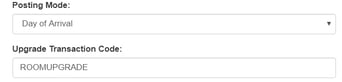
2. Make sure that you checked the option “Exposed to Web Service”.
3. Make sure that Product Type is Bedroom Upsell.
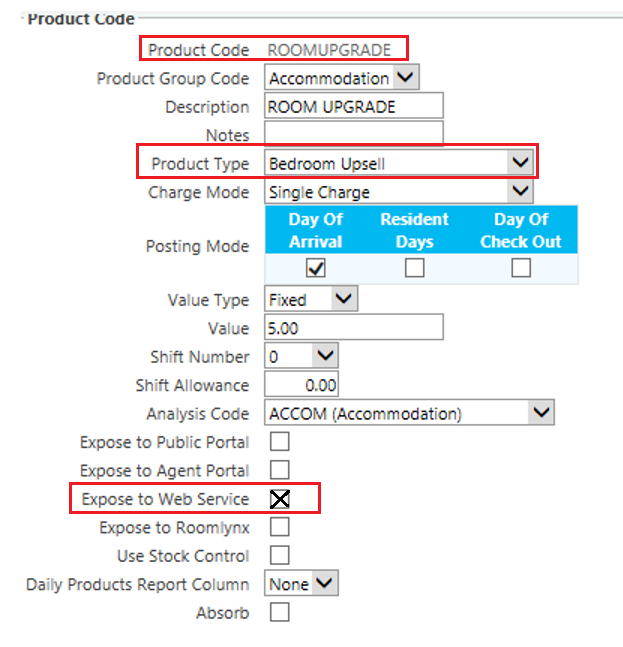 Setup in Guestline
Invalid Product Code (Extras Posting)
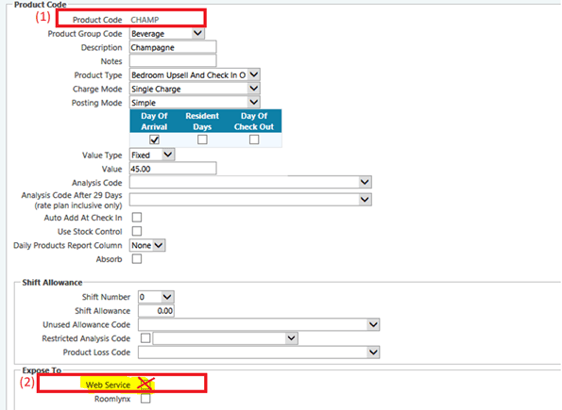
1. Make sure that the Product Code in Guestline is identical with the setup in UpsellGuru: Setup > Extra Types > Setup > Extra Type Identifier.
2. Make sure that you checked the option “Exposed to Web Service”.
Rate Or Room Type Unavailable: Rate plan not exposed to PMS
In your Rate Setup in Guestline, make sure that all your rates are Exposed to PMS (including OTA rates too).
Invalid Room Type/Rate Combination
Make sure your Rate Plans in Guestline applies to all room types that you are offering upgrades to.