
For users managing multiple hotels, regions, or brands
Our platform provides dedicated tools to monitor, compare, and act on performance across your entire portfolio — in one place.
📊 1. Hotel Portfolio Dashboard
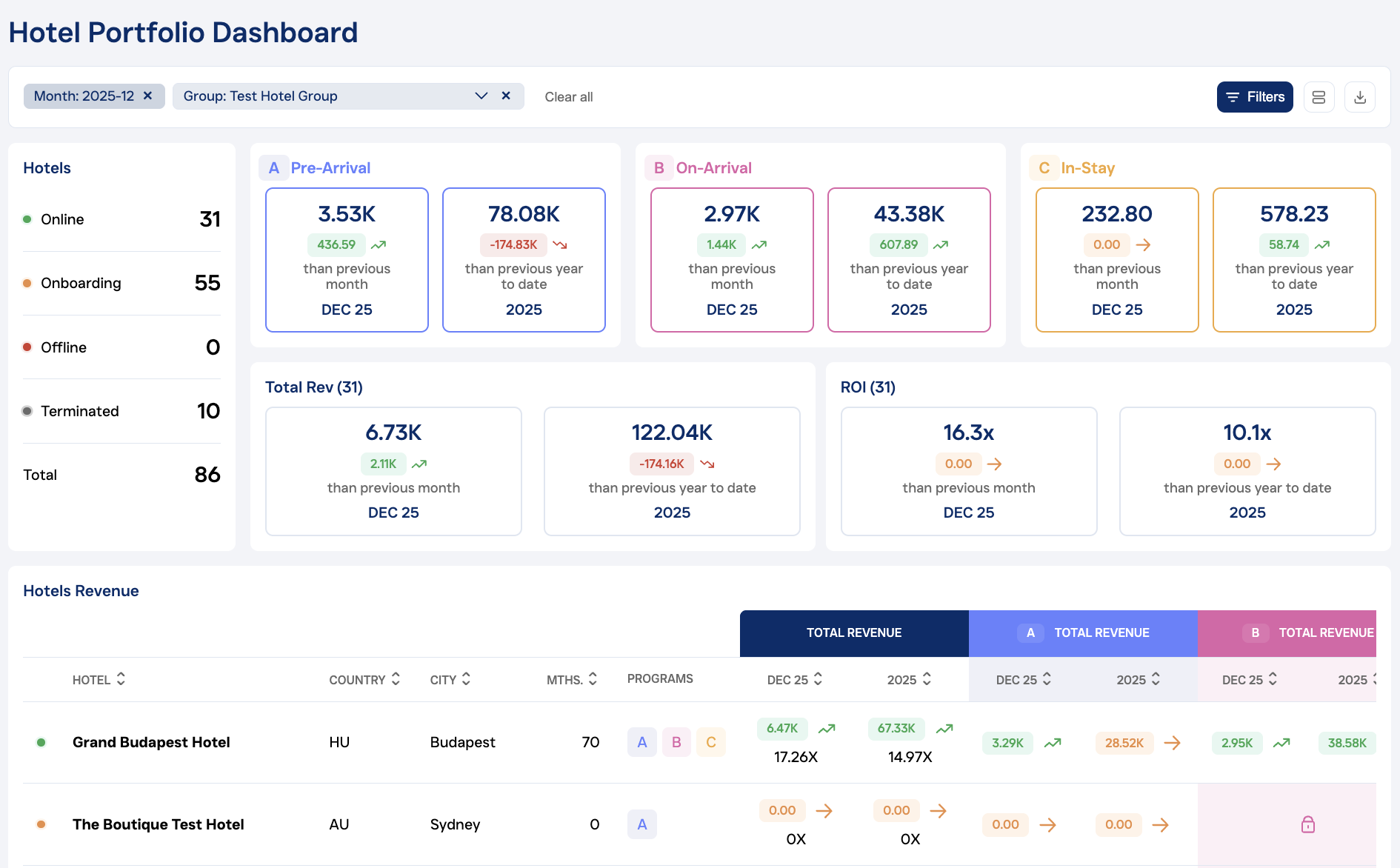
How to access:
Key Features:
-
Custom Views:
-
View all hotels in one list
-
Filter by regions, brands, or hand-pick specific hotels
-
-
Real-Time Insights:
-
Track hotel status, revenue trends, and performance across all upselling programs
-
Programs included: Pre-Arrival, On-Arrival, and In-Stay
-
Compare ROI across your full portfolio at a glance
-
-
Decision-Making Made Easy:
-
Identify underperforming hotels
-
Take action based on live data and trends
-
Support regional teams with targeted feedback
-
-
Exports:
-
Download data in CSV or PDF format
-
📈 2. Multi-Property Performance Report
How to access:
Go to the Reports dropdown → Select Multi-Property Performance
Key Features:
-
Flexible Selection:
-
View results for all hotels, regions, brands, or individual properties
-
-
Detailed Breakdown by Program:
▶️ Pre-Arrival
-
Email delivery & open rate
-
Room upgrades & extras sold
-
Revenue performance
-
Guest segmentation analysis
🛎 On-Arrival
-
Front desk agent performance
-
Room upgrades & extras sold
-
Revenue breakdown
-
Guest segmentation analysis
🏡 In-Stay
-
Email conversion rates
-
Extras performance
-
-
Exports:
-
Download in CSV or PDF formats for presentations and analysis
-
These tools are ideal for regional managers, cluster revenue teams, and corporate leadership who want to stay on top of portfolio-wide performance and react quickly to changes.
Need help setting up your regions, brands or access levels? Reach out to support@upsellguru.com.