
What Is Dynamic Pricing?
Dynamic Pricing adjusts the upsell supplement based on how easy or hard it is to sell a better room.
Think of it like this:
- When demand is low , upgrades should be cheaper to encourage upsells
- When demand is high , upgrades should be more expensive (or close to full price)
Dynamic Pricing makes sure upgrades are:
- Never too cheap (protects revenue)
- Never too expensive (protects conversion)
The Two Ways to Use Dynamic Pricing for Rooms
UpsellGuru offers two different Dynamic Pricing models to calculate upsell supplements:
1. USG Dynamic Pricing (Occupancy-based)
2. Rate Shopper Dynamic Pricing (Supplement-based)
Both use occupancy logic — the difference is how the minimum price is calculated.
Option 1: USG Dynamic Pricing (Occupancy-Based)
With this option, you define a minimum and maximum price range for upgrades.
- The maximum price stays fixed
- The minimum price increases as occupancy rises
Example:
Hotel setup:
Minimum: €50
Maximum: €100
Dynamic behavior of the bidding range:
- 49% occupancy → €50–€100 (original range)
- 70% occupancy → €80–€100 (increased minimum price with increased occupancy)
- 90% occupancy → €92–€100
Best for:
- Hotels with stable pricing between room types- Hotel teams who want full control over pricing limits
- Predictable and consistent pricing behavior
Setup:
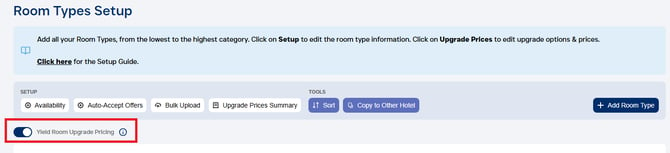
1. Go to Setup > Room Types
2. Enable the "Yield Room Upgrade Pricing" option
Option 2: Rate Shopper Dynamic Pricing
With this option, upgrade prices are calculated automatically using your live room rates from your website.
- The system looks at the price difference between room types
- This difference becomes the maximum upgrade price
- The minimum price is then adjusted based on occupancy
Example:
Standard Room: €100
Superior Room: €160
→ Maximum upgrade price is based on the €60 supplement.
→ The minimum price is then adjusted dynamically based on: Occupancy (hotel & room type) and selected maximum discount (e.g. 40%)
Best for:
- Hotels with frequently changing room rate
- Properties with fluctuating price gaps between room types
- Teams who prefer automated pricing with minimal setupSetup:
1. Request the Rate Shopper to be enabled for your hotel by submitting a request to support@upsellguru.com
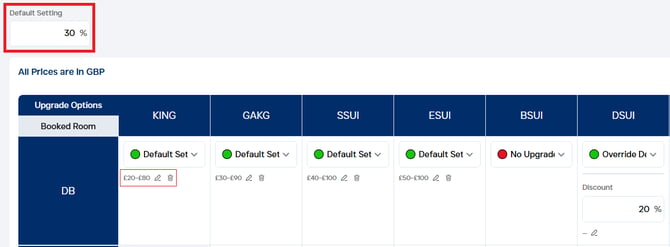
2. Once enabled, go to Setup > Room Types > Upgrade Prices Summary

3. Select a Default Setting: This is the highest discount we will offer (usually when occupancy is lower than 50%)
4. Select per room upgrade option if you are: (1) offering an upgrade for the default setting, (2) if you want to override that discount, or (3) if no upgrades should be offered.
5. You can set thresholds (floor and ceiling options) which does not allow the prices to go below or above certain values.
Which Option Should You Use?
- Choose Occupancy-Based Pricing if you want control and stability
- Choose Rate-Based Pricing if your pricing is dynamic and frequently changing
Both options ensure your upgrade prices stay competitive and aligned with demand.