
Please complete all the below points within protel on premise and UpsellGuru to avoid any errors in the interface.
Room Type Set Up
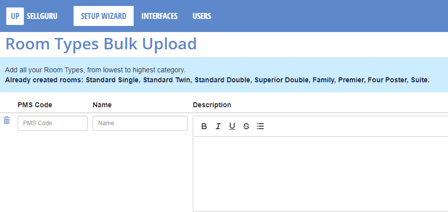
Each room type in UpsellGuru needs a matching part in protel on premise. In order to connect we will need a PMS code for each room type.
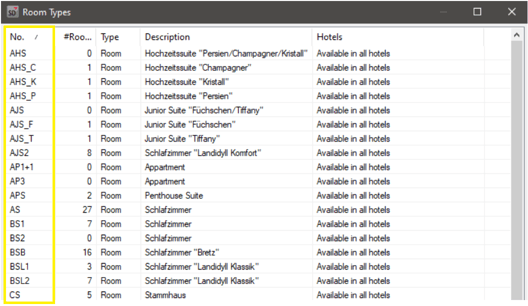
For the room types, the PMS code can be found in protel under System data > Reservation > Room Types.
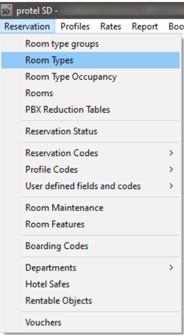
The code that is needed for UpsellGuru is listed under “No.”:
The PMS codes can then be entered in the Room Types Set Up in UpsellGuru as well as the full room type name and description.
Extra Type Set Up
Each extra type that is setup in UpsellGuru also needs a matching part in protel on premise. Here we need two type of codes from protel on premise:
Extra Type Identifier and PMS Transaction Code.
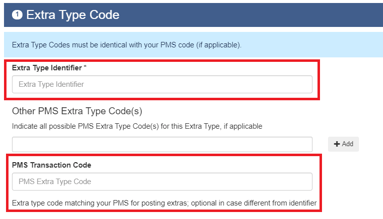
1. Extra Type Identifier
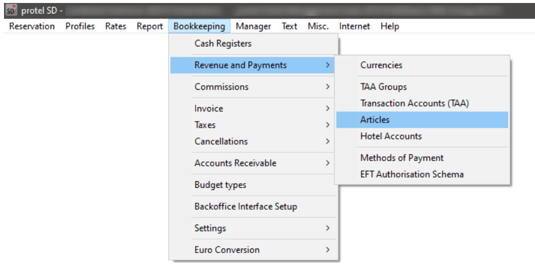
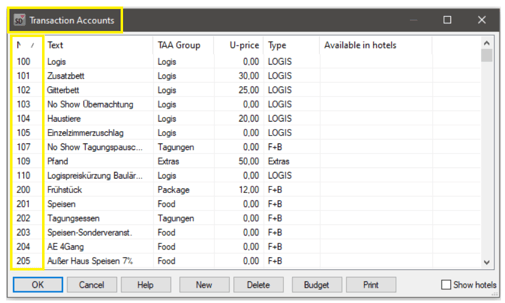
The extra type identifier in UpsellGuru is equivalent to the transaction account number in protel on premise. The TAA number can be found in the protel under System Data > Bookkeeping > Revenue and Payments > Articles.
2. PMS Transaction Code
The PMS Transaction Code is equivalent to the Article Number in protel on premise. The article ID can be found in the protel System Data > Bookkeeping > Revenue and Payments > Articles.
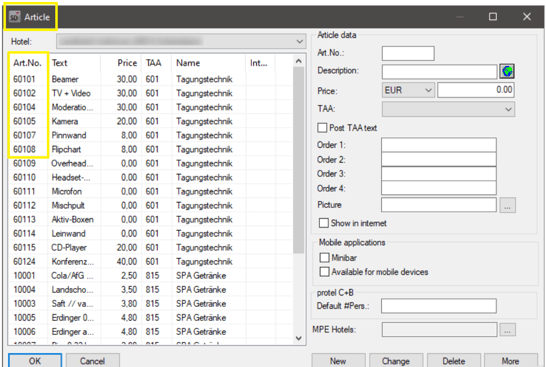
ID and Code have to be entered in the Extra Type Set Up in UpsellGuru as well as the full extra type name and description.
What happens if the Hotel receives an upsell offer?
If the 2-way interface between protel and UpsellGuru is enabled, all happens automatically. As soon as the hotel accepts an upsell, we will post the upsell amount automatically to the guest invoice. For this automated process, we will need an article that can be used for the upsell amount e.g. Accommodation Upsell. Please let us know which article you would like to use and provide us with the protel article ID and code (see screenshots above).
Please note that the original price of the reservation will not be overwritten, UpsellGuru just charges the upsell amount as an additional article to the invoice.